Stay in Claude Science

Sequence work Claude can see, run, and hand back.

Motif is a molecular-biology workbench for Claude Science. View maps and alignments, keep records and notes, and work without leaving Claude Science.

Runs in your browser Nothing leaves your device MIT licensed
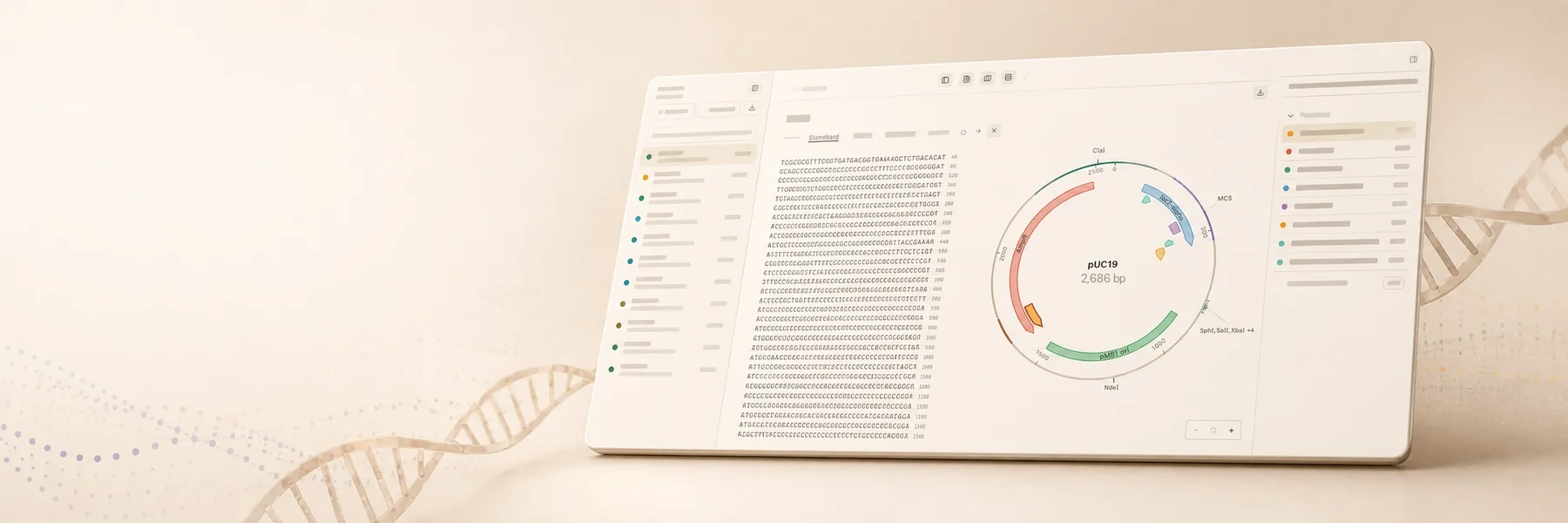
The Motif workbench: a three-pane view with a sequence inventory, a nucleotide sequence pane, and a circular pUC19 plasmid map with labeled features, on a warm cream background.
Hackathon video

Watch the Motif hackathon video.

Made for the Built with Claude: Life Sciences hackathon. Click play to watch it here, or watch it on YouTube.

Motif for the Built with Claude: Life Sciences hackathon · plays on YouTube
Get started

Run Motif in Claude Science.

Motif runs from a local checkout. You need Node 22.12+ and permission for Claude Science to read the Motif folder.

Fastest path

Hand it to Claude Code.

Open Claude Code in a new folder and paste this:

Set up Motif for Claude Science from https://github.com/jvogan/motif

Claude Code reads the setup guide, clones the repo, installs, and registers the connector. You then grant the folder and reconnect in Claude Science, steps 3 to 5 below.

Or run each step yourself.

  1. Get the code

    Clone the repository and install dependencies.

    # needs Node 22.12+
    git clone https://github.com/jvogan/motif
    cd motif && npm ci
  2. Build and register the connector

    One command builds Motif and adds the local connector.

    npm run claude-science:setup
  3. Grant the folder in Claude Science

    Open Permissions and grant the exact Motif folder.
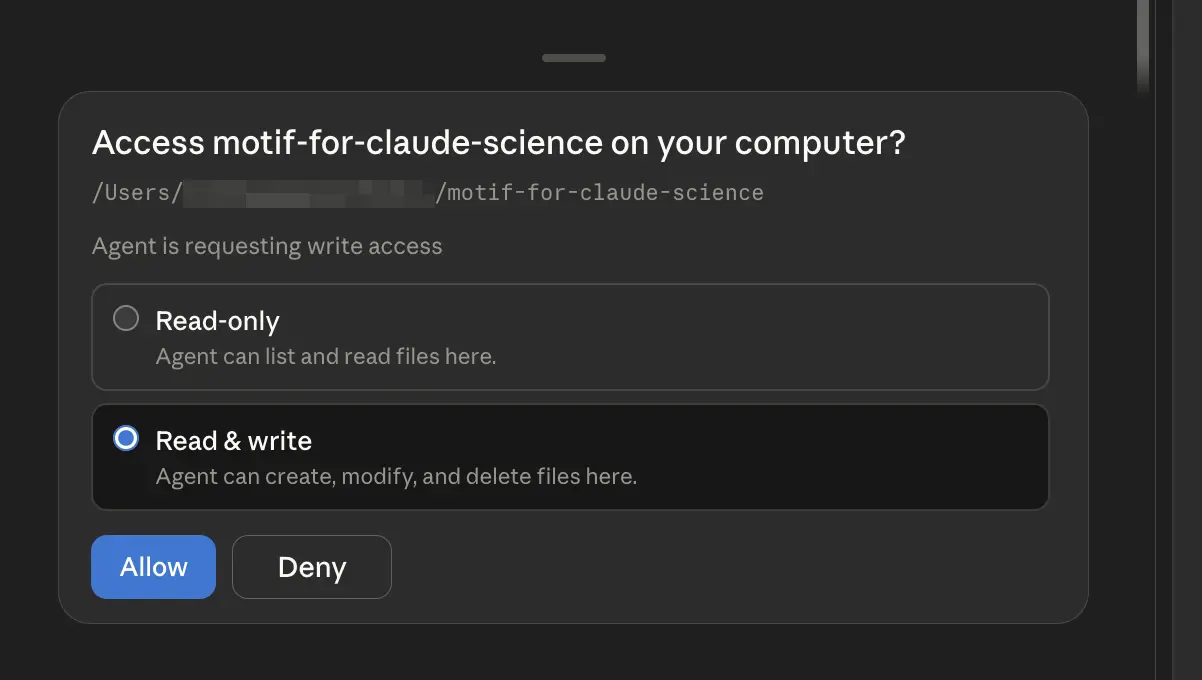
    A dialog asking to access the Motif folder on your computer, with read-only and read and write options and Allow and Deny buttons.
    Grant the folder as read-only or read and write.
  4. Relaunch and reconnect

    Fully quit and reopen Claude Science, then reconnect motif-local.

  5. Confirm, then try it

    motif-local appears under Connectors, in the Custom group. Ask Claude Science to open a sequence, for example Open pUC19 in Motif. Type your request, or speak it with Claude Science's dictation.

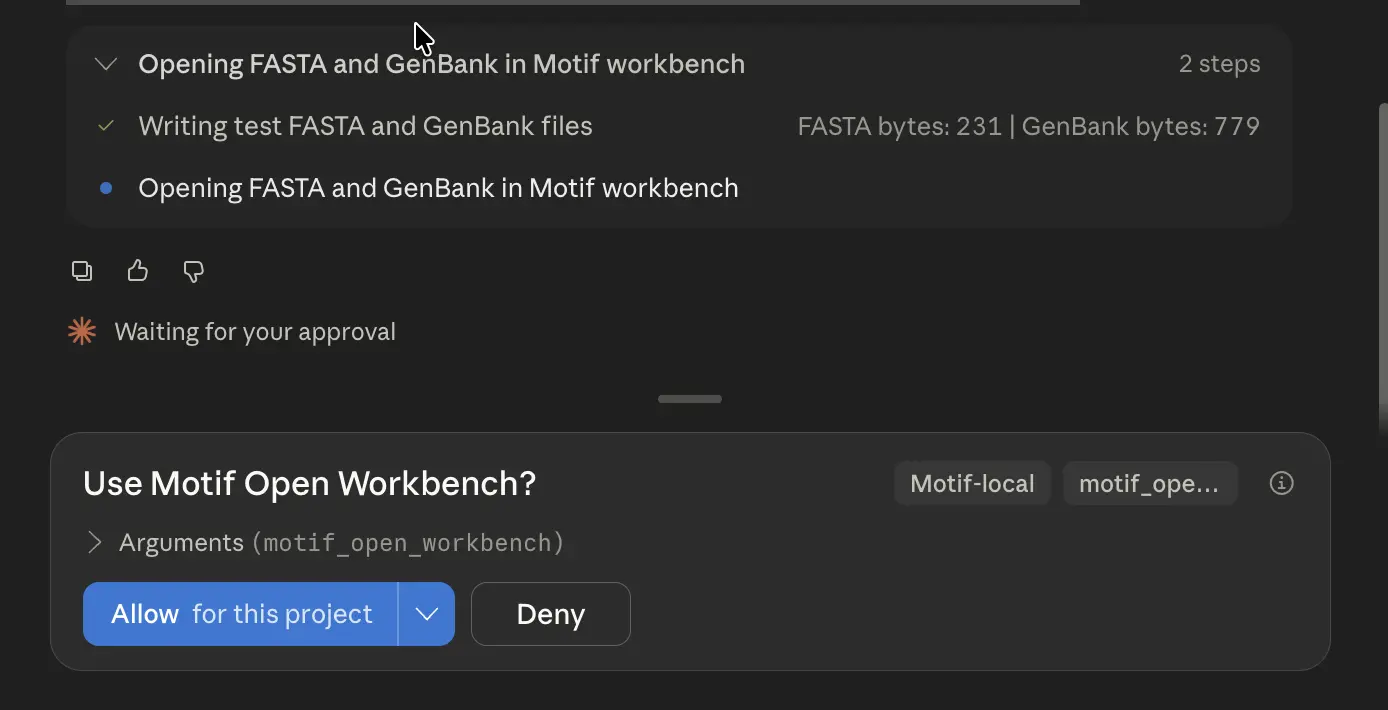
    Claude Science asking to run the Motif open workbench tool, with Allow for this project and Deny buttons.
    Approve the tool call, or choose how long the approval lasts.
Watch

Open a pathway in Motif.

A narrated walkthrough: ask Claude Science to open the beta-carotene pathway, and its four genes load into Motif with sequence, protein translation, and a restriction map. Speak or type your requests, and read every result without leaving Claude Science. Plays with sound.

Beta-carotene pathway: crtE, crtB, crtI, crtY in Motif · 1:28, with voiceover
A worked example

One prompt loads a pathway onto the bench.

In one Claude Science session, ask it to open a pathway. Motif fetches the genes, loads them as records, and aligns the ones you choose.

  1. Ask for the pathway

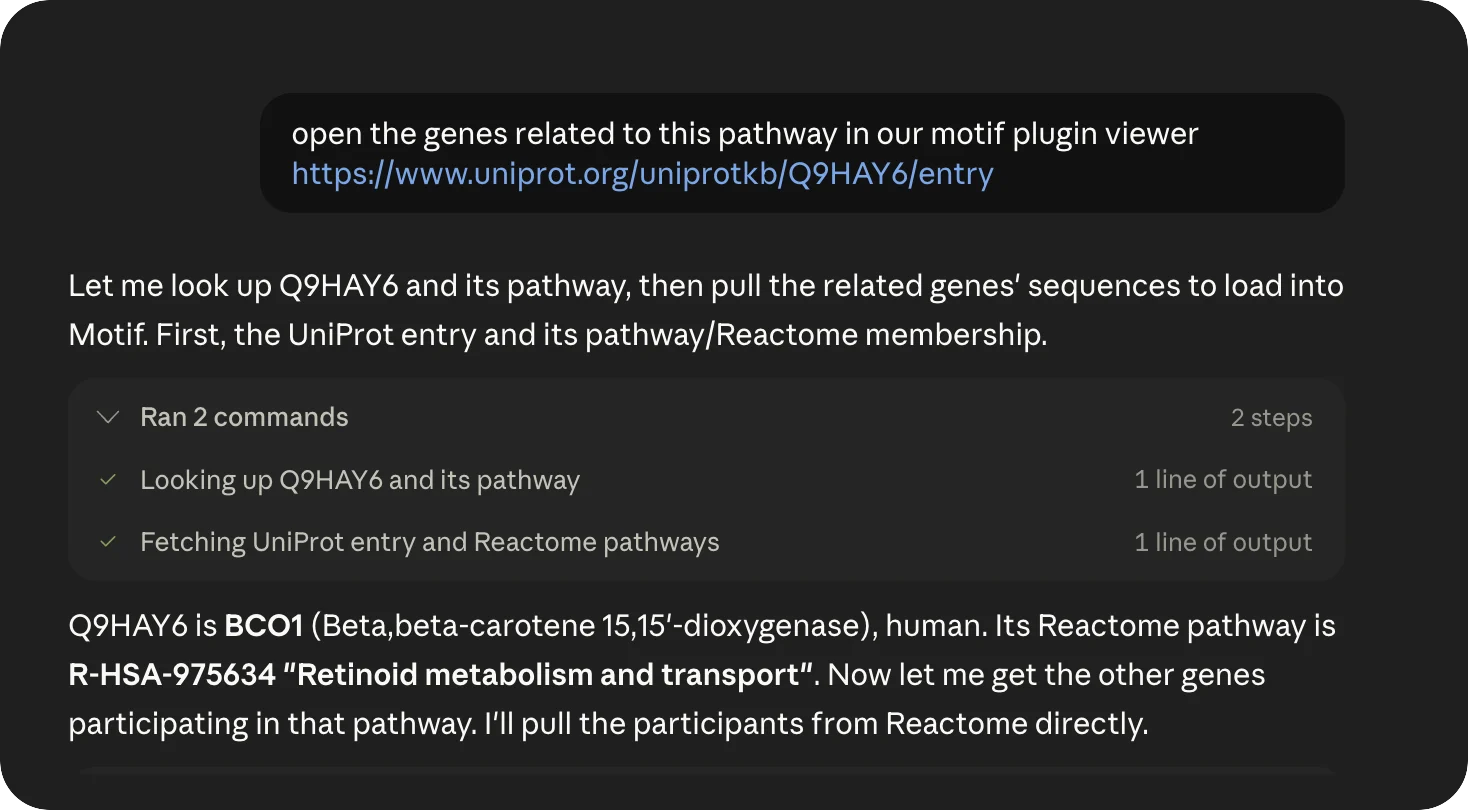
    Point Claude Science at a UniProt entry. It identifies BCO1, finds its Reactome pathway (retinoid metabolism and transport), and fetches the participating genes.

    Claude Science reading a UniProt link, identifying BCO1 and its retinoid-metabolism Reactome pathway, and fetching the pathway's genes.
    UniProt Q9HAY6 → Reactome R-HSA-975634 · retinoid metabolism
  2. Load the set on the bench

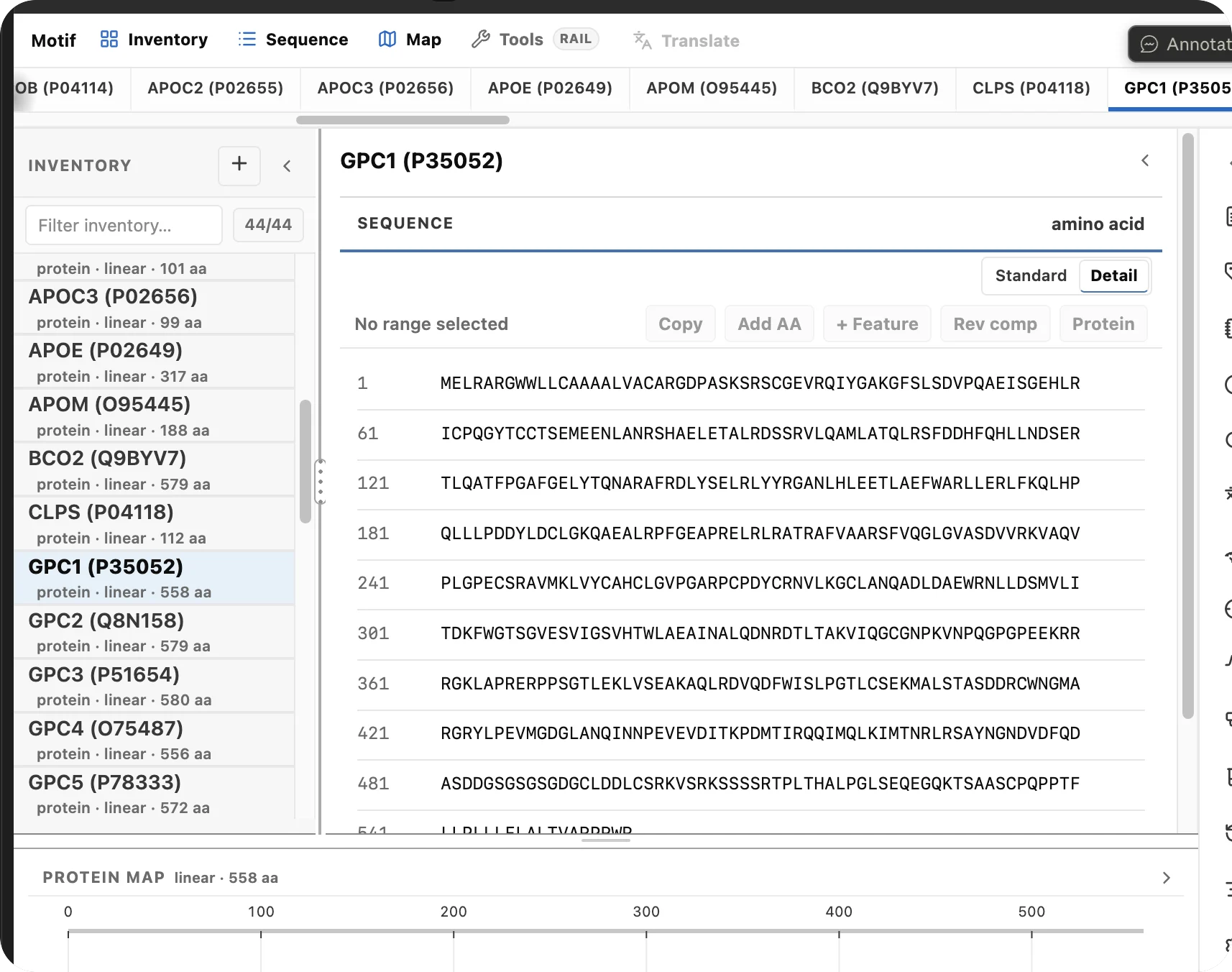
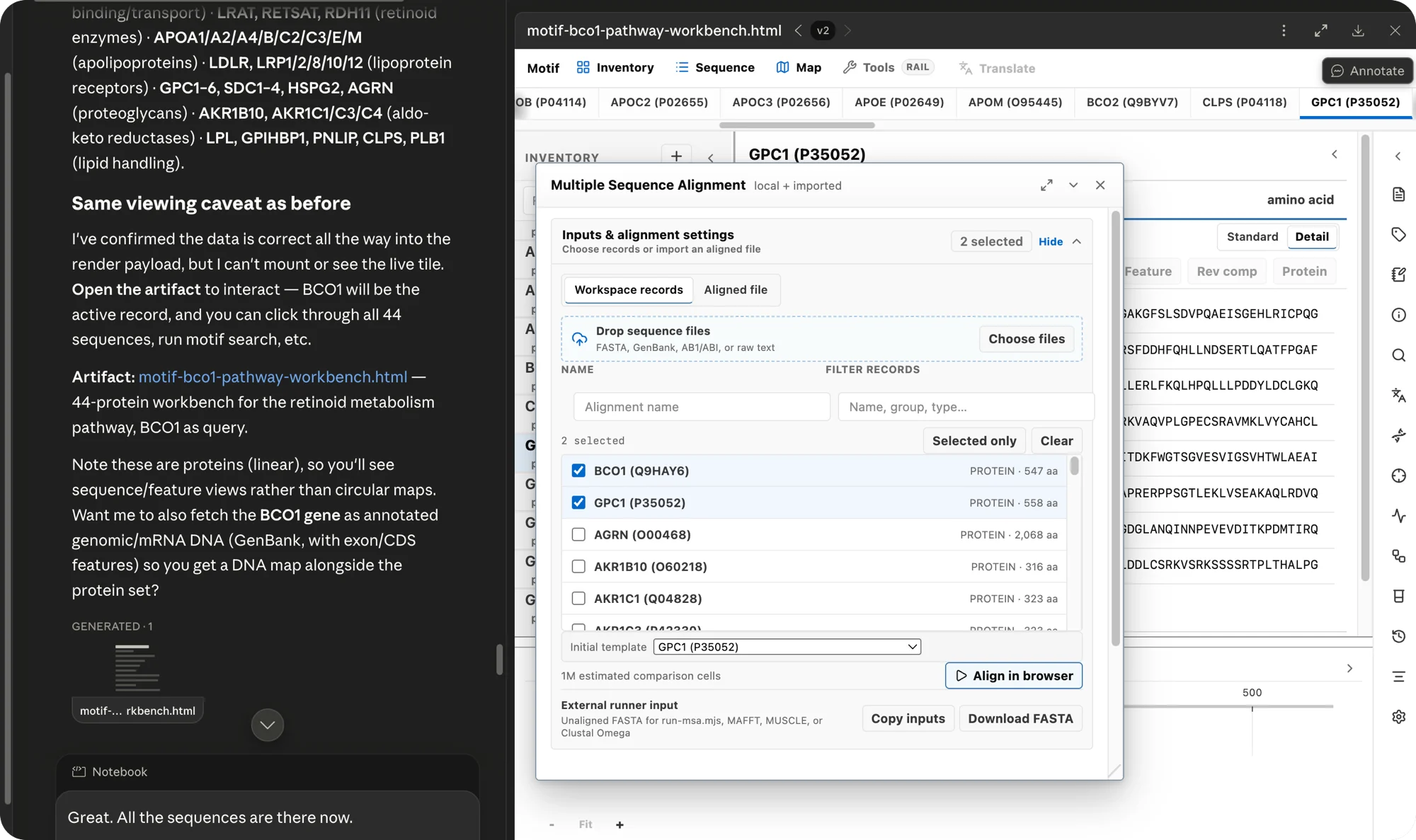
    Forty-four proteins appear in the inventory as records. GPC1's 558-residue sequence and protein map render in the workbench.

    The Motif workbench with 44 pathway proteins in the inventory and GPC1's amino-acid sequence and protein map open.
    44 records · GPC1 (P35052) · protein · 558 aa
  3. Align the proteins

    Select records and run a multiple sequence alignment in the browser, or export the inputs to MAFFT, MUSCLE, or Clustal Omega.

    Motif's Multiple Sequence Alignment dialog with pathway proteins selected and options to align in the browser or export to external aligners.
    Align in browser · or MAFFT / MUSCLE / Clustal Omega
  4. Read the alignment

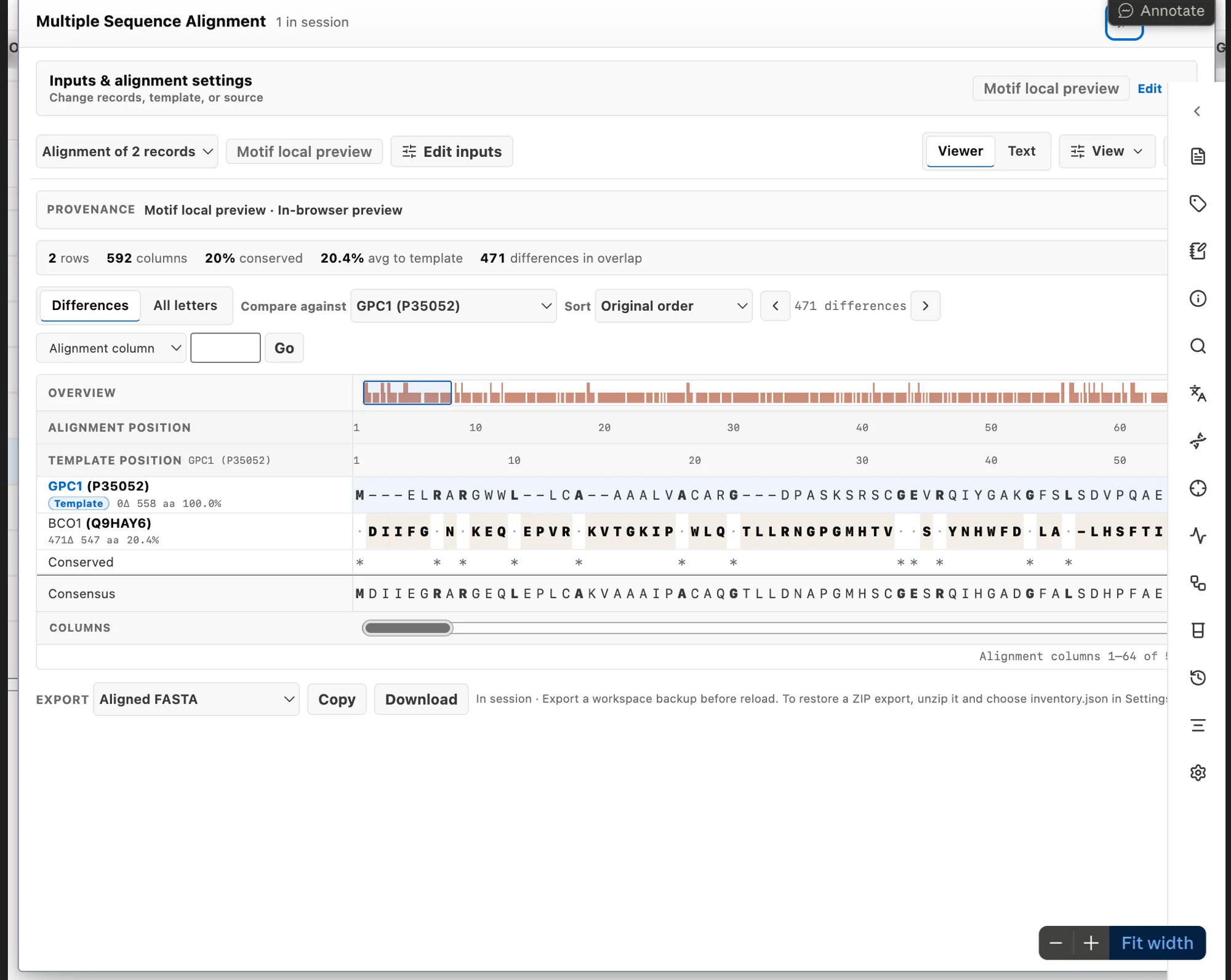
    The alignment is itself a record. Here BCO1 is compared against GPC1: 592 columns, conserved positions, a consensus row, and per-column differences you can export as aligned FASTA.

    A rendered multiple sequence alignment of BCO1 against GPC1: 592 columns with conserved positions, a consensus row, and per-column differences.
    BCO1 vs GPC1 · 592 columns · 20% conserved · export aligned FASTA
One workbench

Maps, alignments, digests, and guide design.

Motif handles your sequence work in Claude Science. Open genes with circular and linear maps, run restriction digests, translate to protein, align records, and design guides. Every record stays on the same workbench. Plays with sound.

Motif across genes, alignments, and guide design in Claude Science · 0:28
Cloning & maps

Plan a construct before you build it.

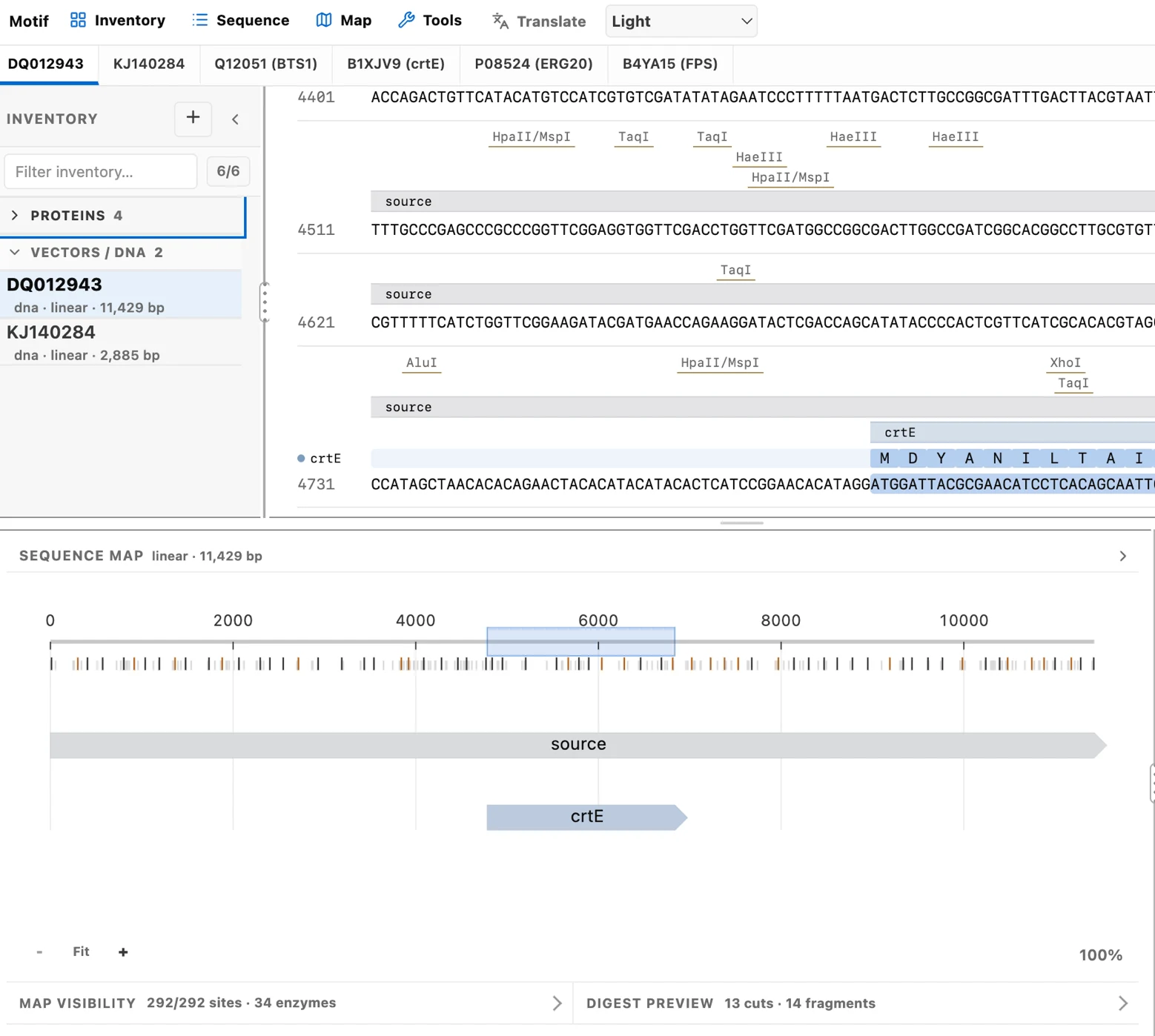
Screen a plasmid against 153 built-in restriction enzymes, isolate the unique cutters, preview the digest geometry, and plan Gibson or Golden Gate assemblies, with internal Type IIS sites flagged during assembly planning.

The Motif workbench on an 11,429 bp record: named restriction sites (HpaII/MspI, TaqI, HaeIII, AluI, XhoI) marked on the sequence, a linear map covered in restriction ticks with the crtE feature, and a digest preview reading 13 cuts and 14 fragments across 292 sites and 34 enzymes.
crtE (DQ012943) · 292/292 sites, 34 enzymes · digest preview 13 cuts, 14 fragments
  • Restriction digest with fragment sizes and cut positions
  • Primer design with Tm / GC tuning and enzyme-tail presets
  • Gibson & Golden Gate planning with compatible-overhang checks
Precise DNA sequence rows run across the canvas; one selected region unfolds into amino-acid translation ribbons above and a complementary strand below.
Sequence → protein · a selected CDS becomes a translated record
Analysis

Translate and analyze a sequence.

Translate a reading frame, optimize codons for E. coli, human, or yeast, align two sequences, or scan for a motif. Each derived record stores its parent and the transform that made it.

  • Six-frame ORF detection, GC plots, and codon-usage analysis
  • Needleman-Wunsch pairwise alignment and IUPAC motif search
  • Translation, reverse complement, and reverse translation
Inside Claude Science

Follow the changes Claude makes.

The Motif workbench in dark mode: the BCO1 protein record selected in the inventory, a residue range highlighted in the sequence pane, the protein map showing range 170 to 277, and the Add Feature panel open on misc_feature.
record → sequence map feature → span selection → analysis
Derived records store the parent they came from and the transform that produced them, so you can trace and edit a construct after the conversation.
Circular and linear maps, sequence panes, digests, and protein views render in the browser. A bridge lets Claude read the underlying records.
A review pass flags internal Type IIS sites, impossible cuts, and stale primer inputs. Fix the input and recompute.
“Trim the 5′ UTR, re-screen the cutters, and translate the new frame.” Motif turns the instruction into workbench actions you can review.
FASTA, GenBank, an annotated map, or the workspace as one self-contained file.
Capabilities

Read, cut, analyze, and export, on one bench.

The bioinformatics functions are deterministic. They run the same whether you click them or Claude does.

153built-in restriction enzymes
6reading frames, always analyzed
3codon tables: E. coli, human, yeast
100%in-browser, no server or upload

Read & inspect

Circular and linear maps that stay synchronized with the sequence.

  • Circular plasmid maps
  • Feature annotations
  • Reading-frame overlays
  • Live GC & length stats

Cut & clone

Plan a construct, with conflicts flagged early.

  • Restriction digest
  • Primer design (Tm / GC)
  • Gibson & Golden Gate
  • PCR simulation

Analyze

Common measurements, computed the same way each time.

  • Six-frame ORF detection
  • Codon optimization
  • Pairwise alignment
  • IUPAC motif search

Transform

Turn one record into another and keep its history.

  • Translation
  • Reverse complement
  • Reverse translation
  • Parent & derivation notes

Import & export

Import and export standard formats, plus a portable snapshot.

  • FASTA
  • GenBank
  • Raw sequence
  • Self-contained workspace

Agent bridge

A small bridge lets Claude read and prepare what's on the bench.

  • Read the active record
  • Inspect a selection
  • Prepare records & digests
  • Explain what it found
The bench, illustrated

One record across its views.

Advanced

Read and prepare from an agent.

With the bench open, a small browser bridge lets an agent read the active record and prepare new ones. The agent prepares records, you verify them.

// read what's on the bench (window.motifHelp() lists them all)
window.motifGetActiveRecord()
// prepare derived records
window.motifAddRecords([])
In Claude Science

Motif as a Claude Science connector.

After npm run claude-science:setup registers the server, Motif is a connector you open from Claude Science. Grant access, choose approvals, then ask Claude Science to open a sequence or build a workbench.

The Claude Science Connectors list, Custom group, showing motif-local added and enabled.
Connectors → Custom · motif-local, enabled

Setup adds one connector named motif-local. It appears under Connectors, in the Custom group with the connectors you added.

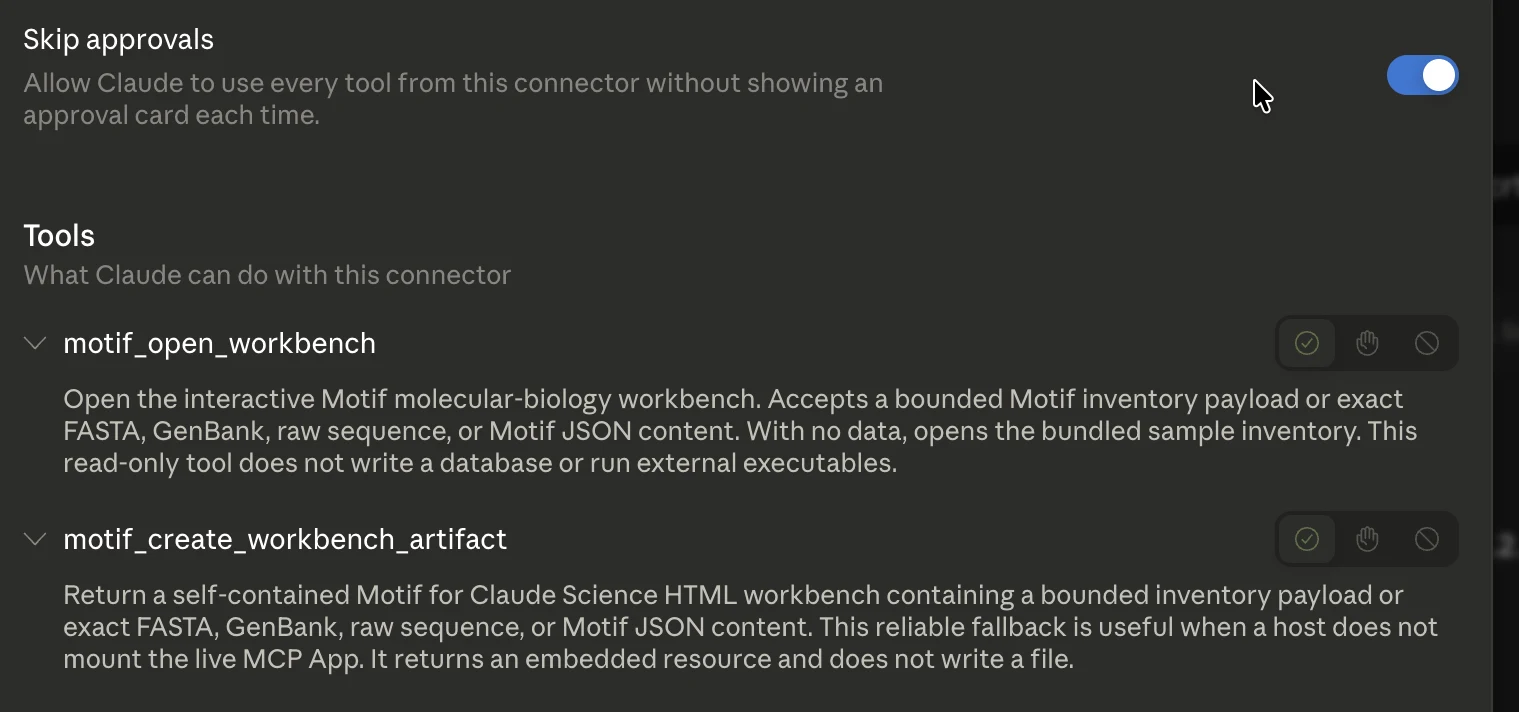
The motif-local connector detail in Claude Science: a Skip approvals toggle and two read-only tools, motif_open_workbench and motif_create_workbench_artifact.
motif-local · approvals and its two tools

Open motif-local to see its two tools, motif_open_workbench and motif_create_workbench_artifact. Leave approvals on and Claude Science shows a card before each call. Turn on Skip approvals to let it run them without a prompt.

One session, end to end

From a paper to a Motif alignment.

Point Claude Science at a paper and ask for its genes. It fetches the records into Motif. Ask it to add homologs and run a multiple sequence alignment.

  1. Ask in plain language

    Paste a paper and ask Claude Science to open its genes in Motif.

    A Claude Science prompt asking it to open the genes characterized in a PLOS ONE paper in Motif.
    PLOS ONE · 10.1371/journal.pone.0096626
  2. Claude curates and fetches

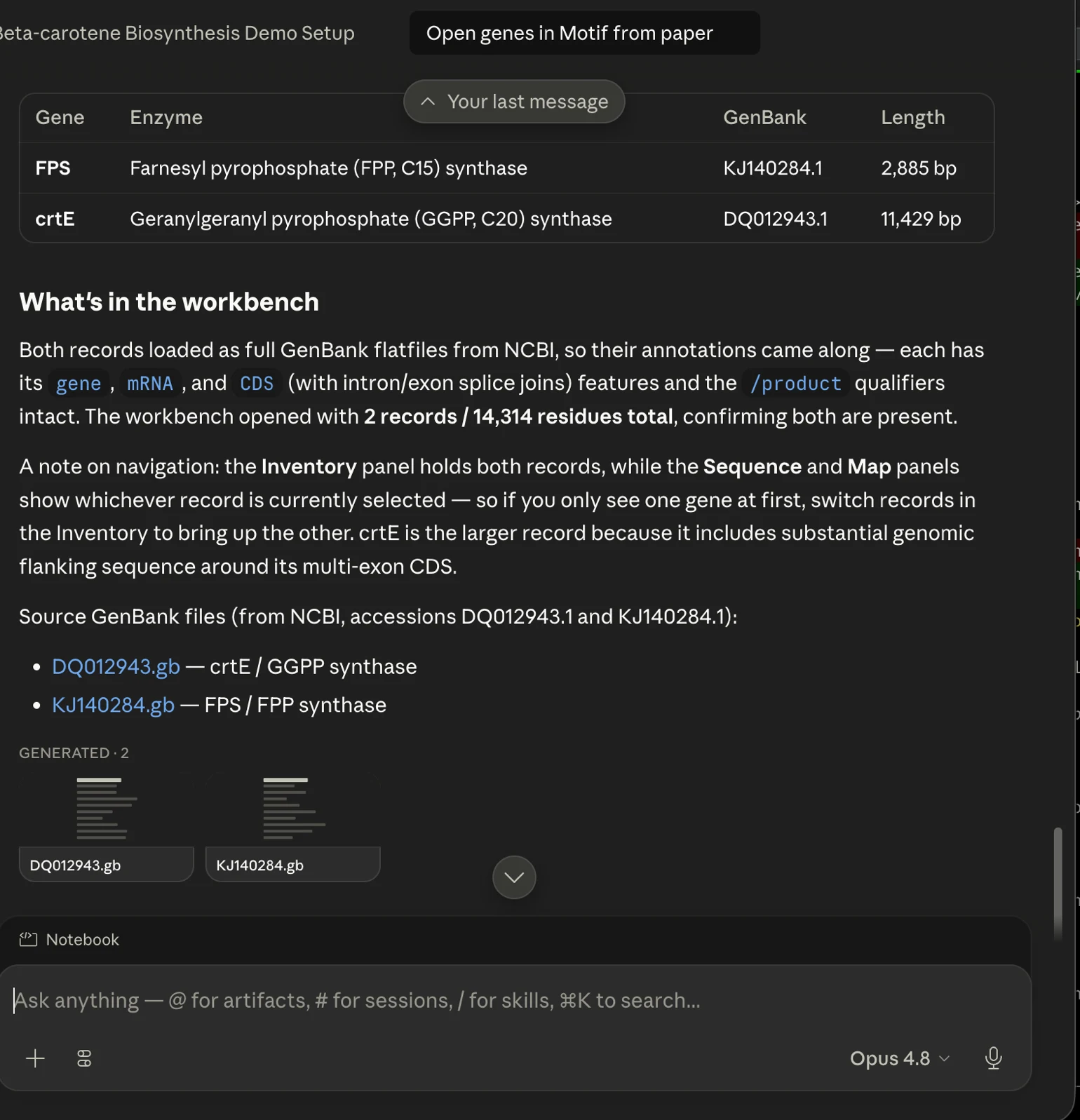
    It reads the paper, identifies the two characterized genes, FPS and crtE, and fetches their full GenBank records from NCBI with annotations.

    Claude Science listing FPS (KJ140284.1) and crtE (DQ012943.1) with their enzymes and lengths, and reporting the workbench opened with 2 records and 14,314 residues.
    FPS KJ140284.1 · crtE DQ012943.1 · 2 records, 14,314 residues
  3. Open in the Motif viewer

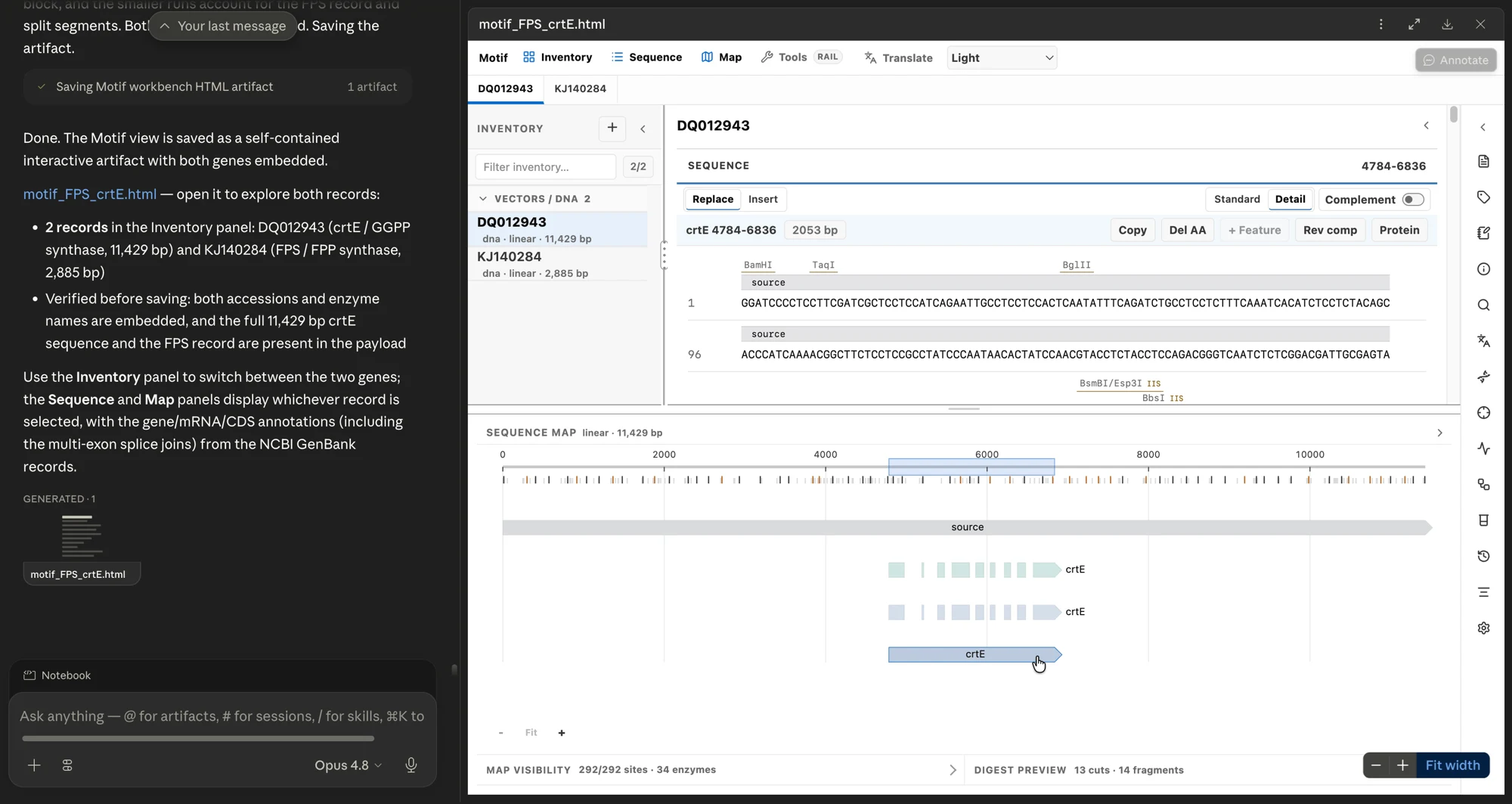
    The records open in the workbench. Inventory holds both genes; Sequence and Map show the selected one, with restriction sites and gene, mRNA, and CDS features.

    The Motif workbench open in Claude Science's right pane: the crtE record (DQ012943), its sequence with restriction sites, and an 11,429 bp linear map.
    motif_FPS_crtE.html · Inventory · Sequence · Map
  4. Iterate and add more

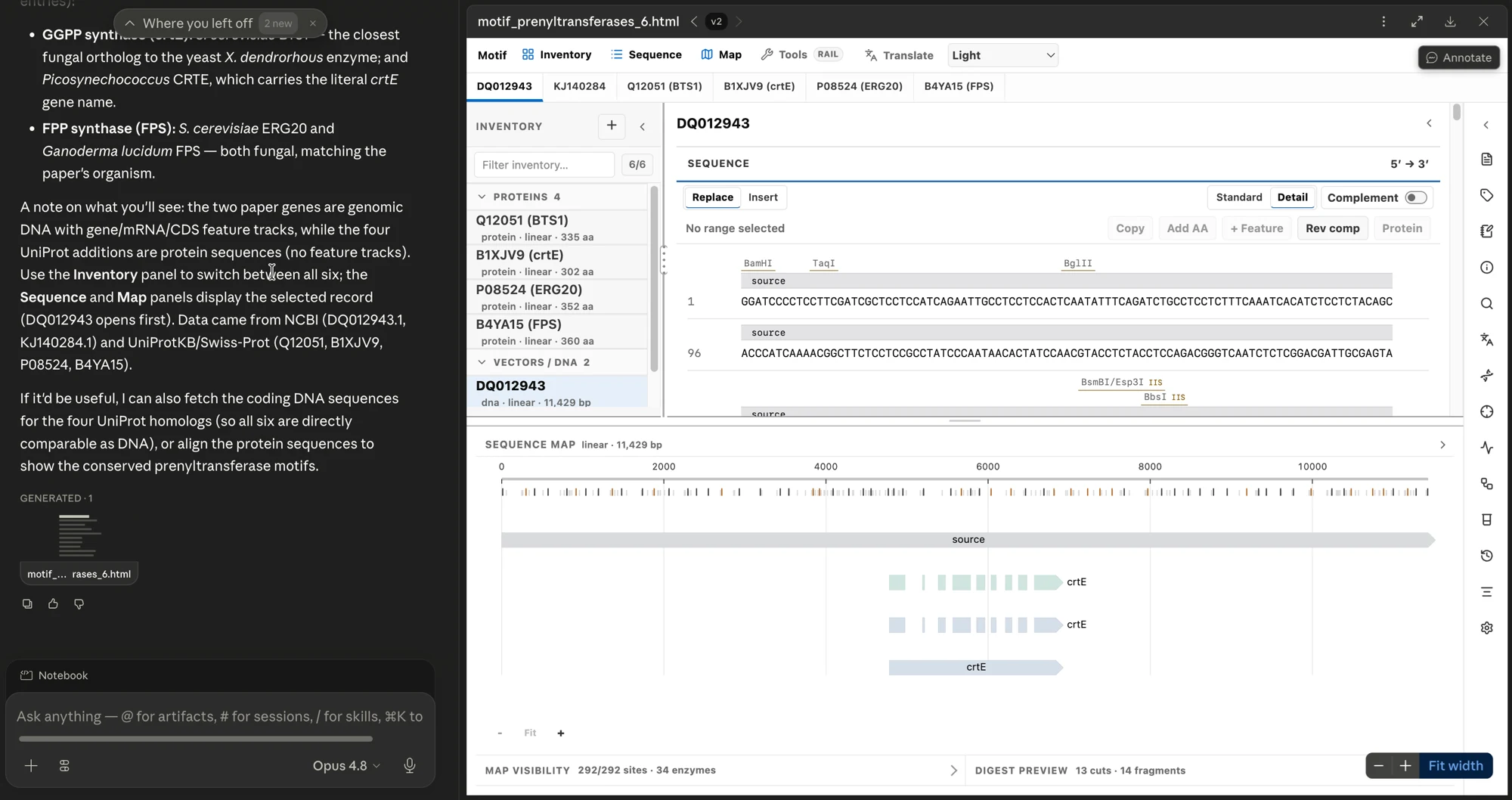
    Ask for more in the same conversation. It pulls two more crtE and two more FPS homologs from UniProt and adds them. The workbench then holds six records.

    The Motif workbench grown to six records after a follow-up request: the two paper genes as DNA plus four UniProt protein homologs (BTS1, crtE, ERG20, FPS).
    6 records · 2 paper genes + 4 UniProt homologs
  5. Align and read it in Motif

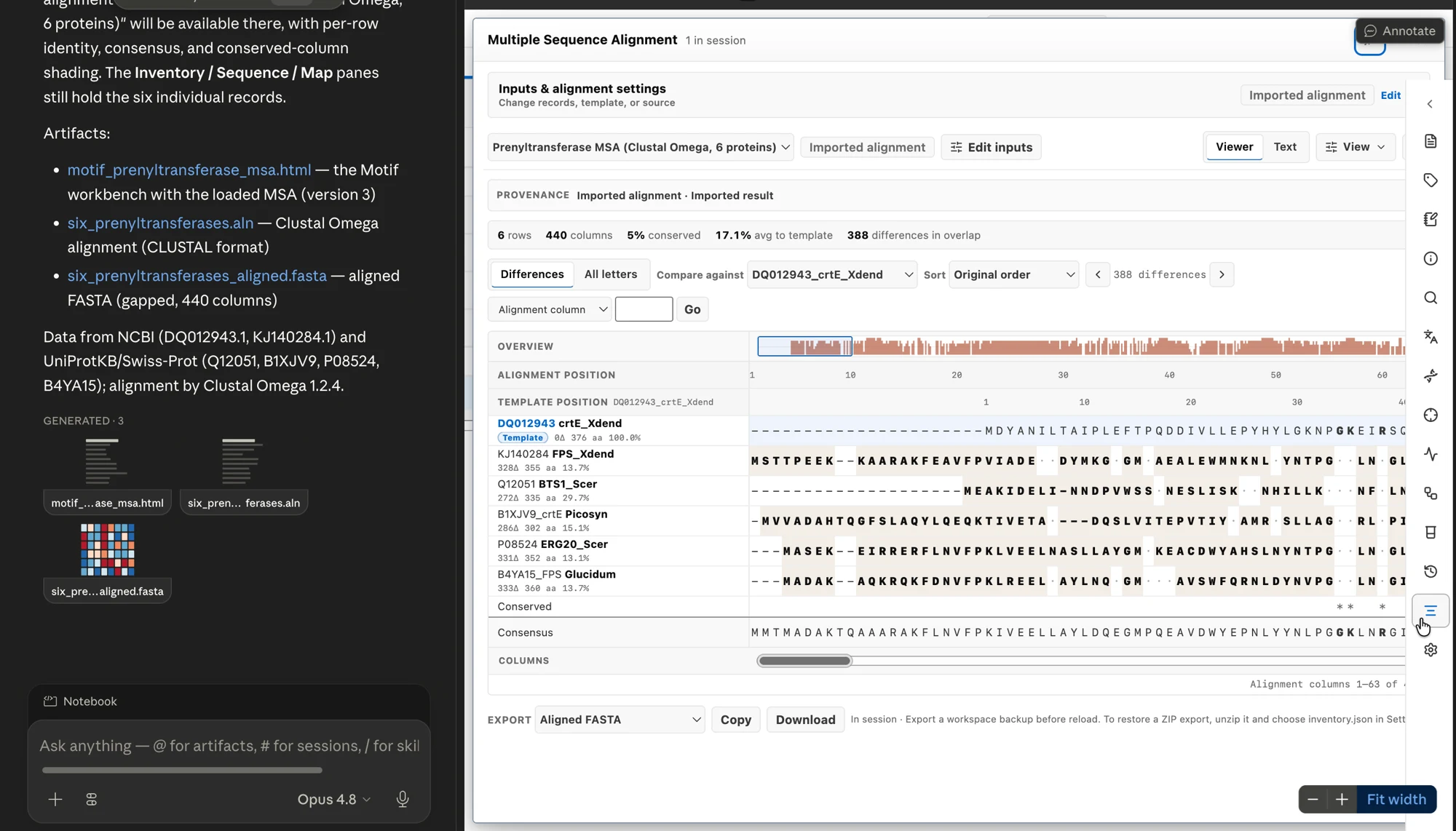
    Ask for a multiple sequence alignment. Claude Science installs Clustal Omega, aligns the six proteins, and loads the CLUSTAL result into Motif's MSA viewer.

    Motif's MSA viewer showing a six-protein Clustal Omega alignment: 6 rows, 440 columns, with per-row identity, consensus, and conserved-column shading.
    6 rows · 440 columns · Clustal Omega 1.2.4

If the workbench does not open in the viewer

Claude Science sometimes finishes by saving the workbench without opening it. Ask it to open the records in the Motif viewer, or include that in your first prompt.

If setup gets stuck

Common problems and their fixes.

Most setup problems are about giving Claude Science's sandbox access to your files. The troubleshooting guide covers the rest.

“Operation not permitted,” or the tools won't load
Claude Science's sandbox is blocking the folder. Open Permissions in Claude Science and grant the exact Motif folder, then fully quit and reopen the app. Reconnect alone does not apply a new grant.
The tool ran, but no workbench appeared
A text summary or resource link only means the tool ran, not that Claude Science mounted a visible workbench. Ask Claude to create a Motif workbench artifact, for example “please open this in the Motif workbench.” It generates an HTML artifact that opens in the right pane. Some Claude Science builds do not mount the live tile on their own.
The sequence shows as plain text
This is Claude Science's generic fallback display. Open the generated workbench artifact to see the sequence rendered.
The connector shows up, but its tools are missing
Rebuild, then reconnect the existing motif-local entry. Do not add a second one. If a tool's inputs or schema changed, relaunch Claude Science and start a fresh kernel so the new definition loads.
Node installed through nvm or asdf gets denied
A Node binary inside a version manager is often outside the granted folder. Use a system or Homebrew Node 22.12+, or grant that Node's folder and rerun setup with its path. The troubleshooting guide shows the command.
Starter prompts

Try one of these prompts.

Open Motif in Claude Science and paste any of these.

Motif's mascot: a pixel-art crab in a lab coat holding a test tube of green liquid.

Meet the lab crab

The Motif mascot.

Welcome to the bench
“Open pUC19 and highlight the unique cutters.”
A circular map with single-cut enzymes flagged.
“Translate the lacZα region and save it as a protein.”
A new protein record, with its parent recorded.
“Design primers to amplify the MCS, about 250 bp.”
A primer pair with Tm, GC, and product size.
“Plan a Golden Gate assembly and flag internal BsaI sites.”
An ordered plan with Type IIS conflicts called out.

Open Motif in Claude Science.

Load a plasmid, then inspect the records that come back.